AI Planners for Anxiety: Calm Routines That Stick

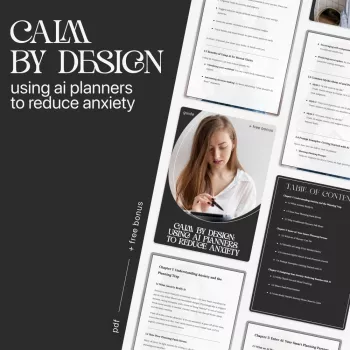
Calm by Design: Using AI Planners to Reduce Anxiety
Anxiety often spikes when tasks feel vague, priorities compete, and the day has no clear edges. An AI planner can turn mental clutter into a simple plan by translating worries into small next steps, building gentle routines, and reducing decision fatigue. Used well, it becomes a supportive “external brain” that stores open loops so your nervous system doesn’t have to. If anxiety feels persistent or intense, it may also help to review trusted information from the National Institute of Mental Health and the American Psychological Association.
Why planning can ease anxiety (and when it can backfire)
Anxiety thrives on uncertainty. When your mind can’t predict what happens next, it keeps scanning, rehearsing, and re-checking. A plan creates a clear “next step,” reduces open loops, and makes the day feel more bounded.
Planning also lowers decision fatigue. Pre-deciding a few defaults—when you check messages, how you start work, what a “good enough” finish looks like—reduces the number of stress-inducing micro-choices.
Planning can backfire when it becomes perfectionism. If you keep optimizing the plan to avoid discomfort, the planning itself turns into a stall tactic. A healthier goal is a “good enough” plan with buffers and flexibility: direction without rigidity.
Most importantly, use planning as reassurance, not judgment. A task list is a storage system, not a scoreboard. You’re building containment for worry, not a test of worth or productivity.
What an AI planner does differently
Traditional planning tools often depend on you to clarify everything upfront—what matters most, how long it takes, and how to start. An AI planner can reduce that friction by helping you translate fuzzy stress into workable structure.
- It turns a messy brain-dump into categories (must-do, should-do, could-do) and finds the smallest next action.
- It suggests realistic time blocks, including breaks and transition time, so you don’t schedule an imaginary day.
- It creates “scripts” for hard moments: starting prompts, if-then plans, and gentle reminders.
- It highlights hidden load (prep work, follow-ups, waiting time) that often triggers last-minute panic.
- It supports reframing by converting catastrophic thoughts into checklists and contingency plans.
Common anxiety triggers and AI planning responses
| Trigger | How it shows up | AI planner output to request |
|---|---|---|
| Too many tasks | Shut down, procrastination, doom-scrolling | A 15-minute starter plan with only 1–3 actions |
| Fear of forgetting | Constant mental rehearsal | A capture system + scheduled review reminders |
| Unclear priorities | Everything feels urgent | A ranked list based on deadlines, impact, and energy level |
| Perfectionism | Endless tweaking, slow starts | A “minimum viable” version and stopping rules |
| Time blindness | Underestimating how long things take | Time estimates + buffers + a fallback “short day” plan |
Set up a nervous-system-friendly planning system
The calmer your system, the calmer your planning feels. The goal is fewer moving parts, less app hopping, and more predictable “anchors” that tell your brain the day is being handled.
- Pick one home base. Use one calendar and one task list (even if they live in the same app). Anything else should be optional, not required.
- Create three daily anchors. A short morning preview (2–5 minutes), a midday reset (1–3 minutes), and an evening closure (3–7 minutes).
- Build buffers on purpose. Add 10–25% extra time for transitions, interruptions, and recovery. A plan that assumes zero friction is a stress machine.
- Use micro-plans during high anxiety. Plan only the next 30–90 minutes. A smaller horizon can reduce the sense of threat.
- Keep a “worry list.” Give anxious thoughts a container. Capture them, then decide later whether they become tasks, questions, or “not now” items.
Prompts that turn anxiety into a workable plan
A simple 7-day calm-by-design routine
Using the guide and checklist for stress-free living
Helpful products for calmer routines
- Calm by Design: Using AI Planners to Reduce Anxiety – The Ultimate AI Planner to Reduce Anxiety Guide, eBook & Checklist for Stress-Free Living ($9.99) — a practical setup path with a quick checklist for high-stress moments.
- 7-Piece PE Rattan Patio Furniture Set with Cushions, Modular Sectional Conversation Set ($815.49) — for creating a dedicated decompression space that supports breaks and shutdown rituals.
- Cat Scratching Tower with Coconut Tree Design, Hammock, and Dual Levels ($387.32) — a way to give pets an engaging “home base,” which can reduce household friction during focus blocks.
Product: Calm by Design eBook and checklist
If you want a ready-made system rather than piecing one together, the Calm by Design eBook and checklist focuses on using AI planning methods to reduce overwhelm and improve follow-through—without turning your day into a rigid timetable.
| Component | Purpose | How to use it |
|---|---|---|
| Guide (eBook) | Build a calmer planning system | Follow setup steps, then implement weekly |
| Checklist | Reduce overwhelm quickly | Run it when anxiety spikes or time feels tight |
| Prompt set | Turn thoughts into next actions | Copy/paste and adjust for context |
FAQ
Can an AI planner help with anxiety without making life feel over-scheduled?
Yes—use micro-planning (the next 30–90 minutes), add buffers, and keep a “minimum viable day” template for tough days. The plan works best as flexible guardrails, not a rigid timetable.
What should be shared with an AI planner, and what should stay private?
Share task details, deadlines, constraints, and preferences (like energy patterns or meeting windows). Keep sensitive identifiers private, describe situations generally when needed, and review the planner app’s privacy settings before storing personal information.
How do you stop planning from turning into procrastination?
Set a short planning timer (5–15 minutes), identify the smallest next action, and use a simple start script that gets you moving before the plan is perfect. If you’re still tweaking, begin the first step and refine later.















Leave a comment